

Check in from the phone, then wait anywhere
The patient taps I've arrived. The front desk confirms who she is and gives her a ticket. Then the line moves on the waiting room TV, the desk's Live queue and her own phone, which tells her when two are ahead.
Klinik Sejahtera Bangsar
Now calling Sedang dipanggil 正在叫号
P-003P-004P-005P-006Room 2 · Dr Lim Mei Ling
Next up Seterusnya 下一位
- A-003Room 4
- P-004Room 2
- H-007Room 1
- B-006Room 3
- A-007Room 4
- P-005Room 2
- H-008Room 1
- B-007Room 3
- A-008Room 4
- P-006Room 2
- H-009Room 1
- B-003Room 3
Follow your place in the app Ikuti giliran anda dalam aplikasi
Live queue
Your queue numberYour queue numberYour queue numberIt's your turnLive
P-006- Now serving
- P-002P-003P-004P-005
- Ahead of you
- 3 people2 people1 person0 people
- Est. wait
- ~55 min~40 min~25 minNow
Dr Lim Mei LingRoom 2 · Klinik Sejahtera Bangsar
Now: P-002P-003P-004P-005You: P-006
Your turn is near. Come back to the waiting room.
- Turn left at the front desk
- Room 2 is the second door on your right
Come within 5 minutes, or the next ticket may be called.
I'm on my wayRebuilt with the TV's and the app's own labels from the demo clinic's queue: Dr Lim Mei Ling's tickets, Room 2 and the directions the clinic wrote for it. Tickets and times are synthetic.
How it works
From the door to the doctor's room
A ticket is given only once the front desk knows who is standing there. After that, everyone reads the same line.
-
She taps I've arrived
From an hour before her visit to 30 minutes after it starts, in Sona Care or the patient portal. Nothing reads where she is. Her phone then shows a check-in code, and Sona Care shows it as a QR too.
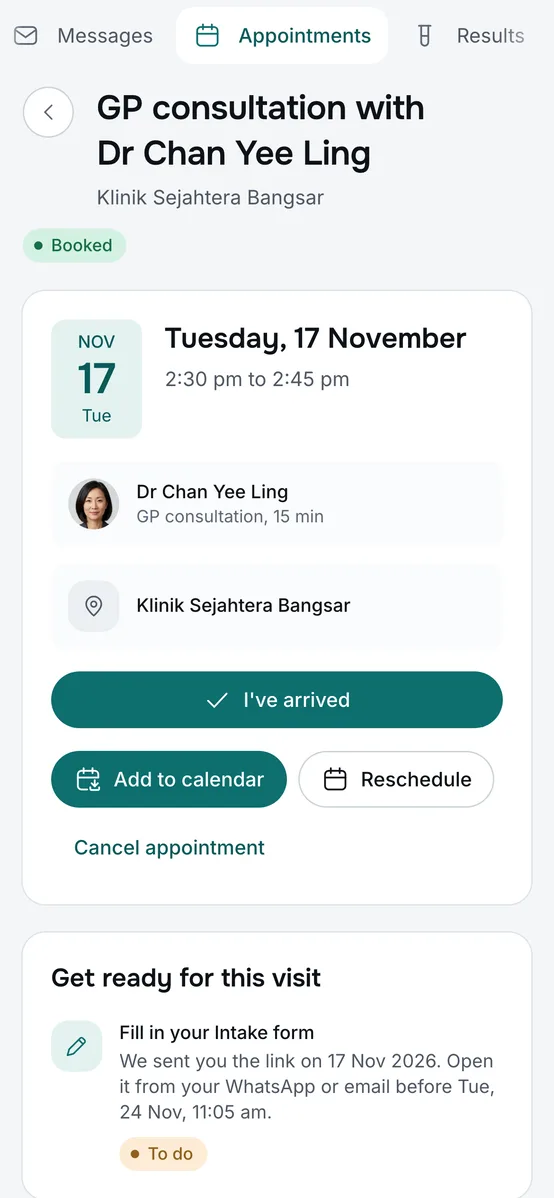
The patient portal on a phone, the demo patient's visit today. -
The desk confirms who she is
Front desk scans her QR or types the code. If they already checked her in or verified her today, one tap confirms. Confirming checks her in and gives the ticket: her doctor's letter and the next number of the day.
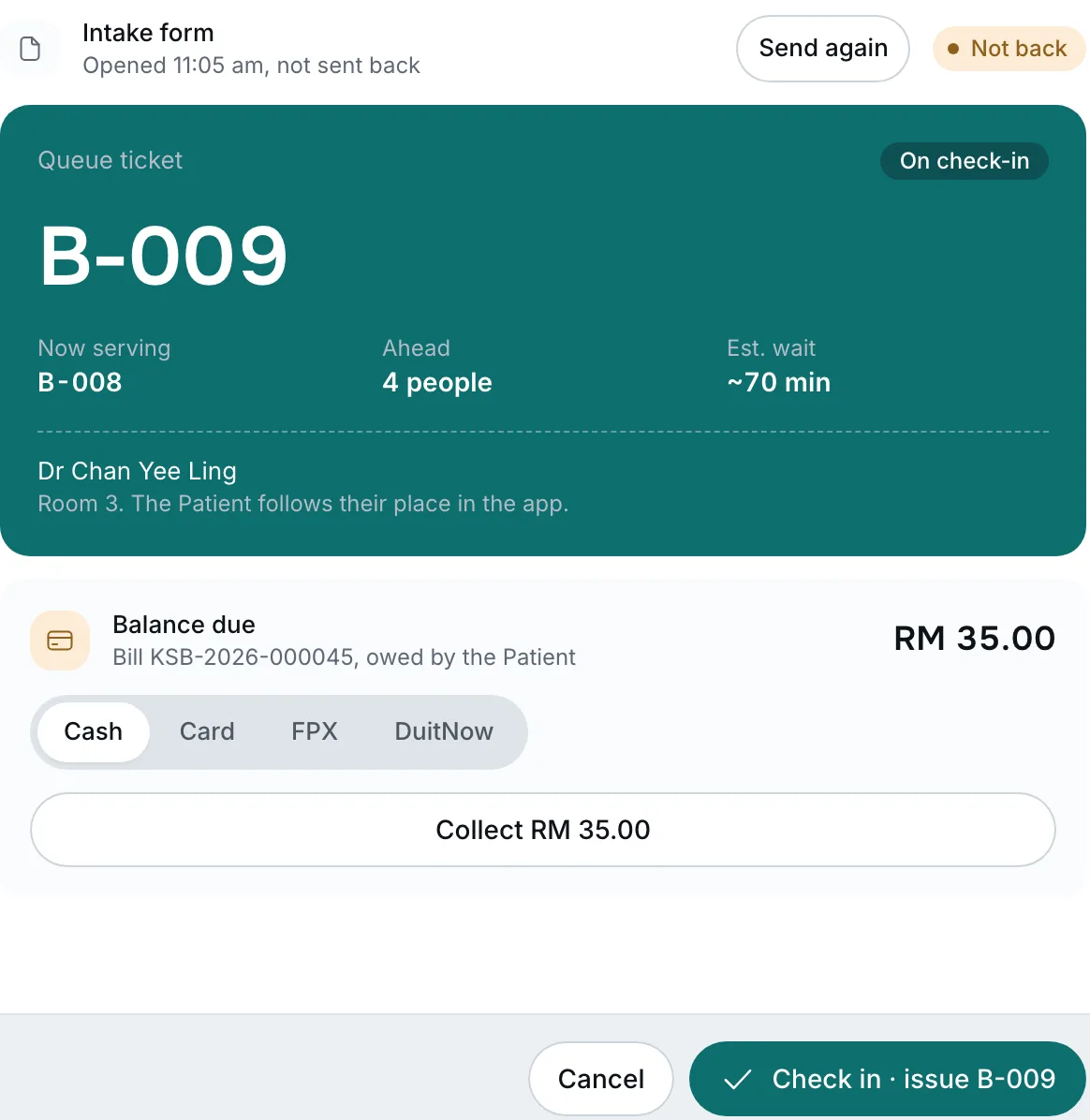
Sona Pro on the web. The check-in drawer shows the ticket before it is given, and any balance to collect. -
The desk runs the line
One card per doctor with their room and the ticket now serving. Call next, call one out of turn, recall, or tell a patient in the app that their turn is near. A ticket called and not seen becomes a no-show, which opens a Case to follow up.
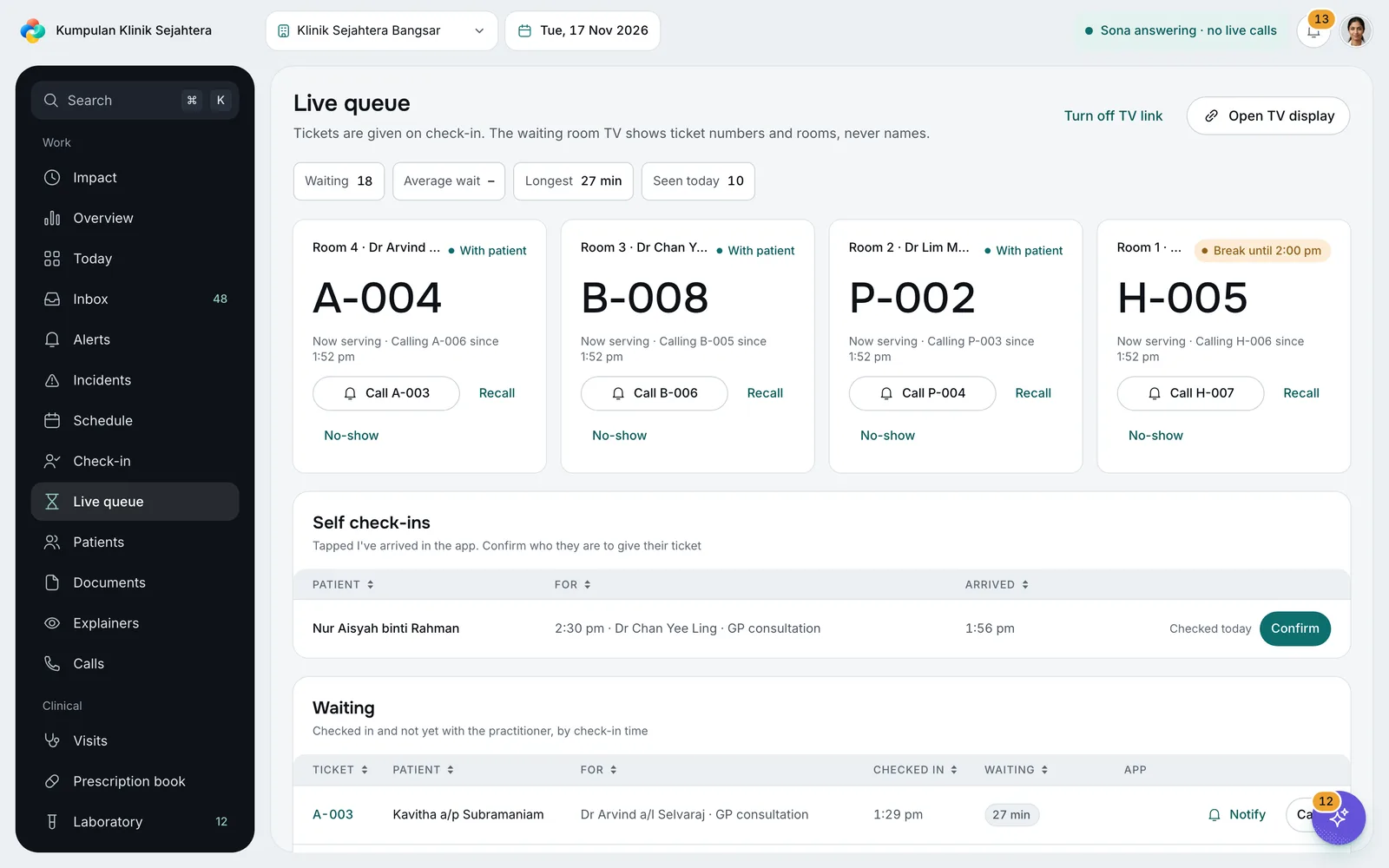
Sona Pro on the web, Live queue, with a self check-in waiting for the desk. -
The waiting room TV calls the ticket
The ticket being called, large, then who is being seen and who is next, each with the room. Labels in English, Malay and Chinese. Once sound is on, it says the ticket and the room in all three.
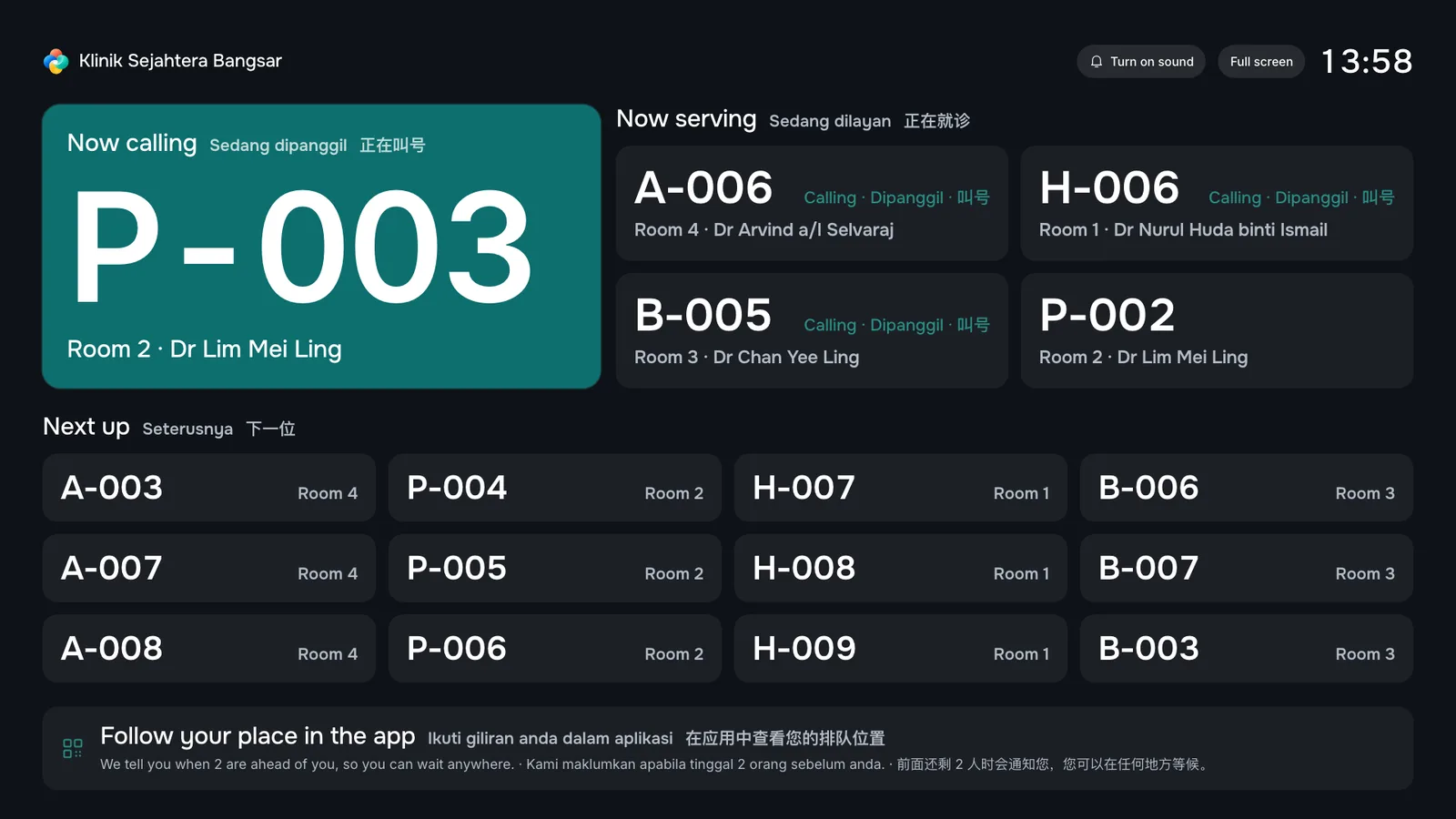
The TV display, opened from a link a Clinic admin makes. Codes and rooms, never a name.


Intake forms
The form is done before she arrives
The clinic sends a one-time link on WhatsApp or by email. Nothing she sends goes into her record until the front desk accepts it, one field at a time.
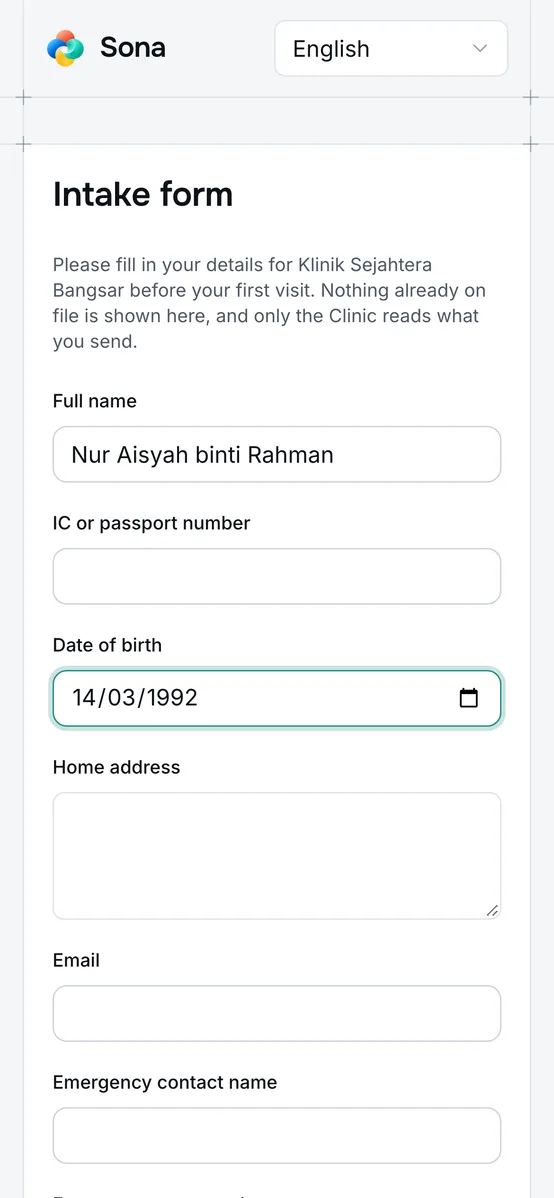
- Name, IC or passport, date of birth, address, email and an emergency contact, plus up to 10 questions of the clinic's own.
- The form shows nothing already on file, so it needs no sign-in. The link works for 7 days or one form.
- She can add a photo of her insurance or panel card. Its cover details are proposed in code for the desk to check, and neither the photo nor its text goes to a model.
- Allergies she lists are shown to her doctor, never written into her record from the form.
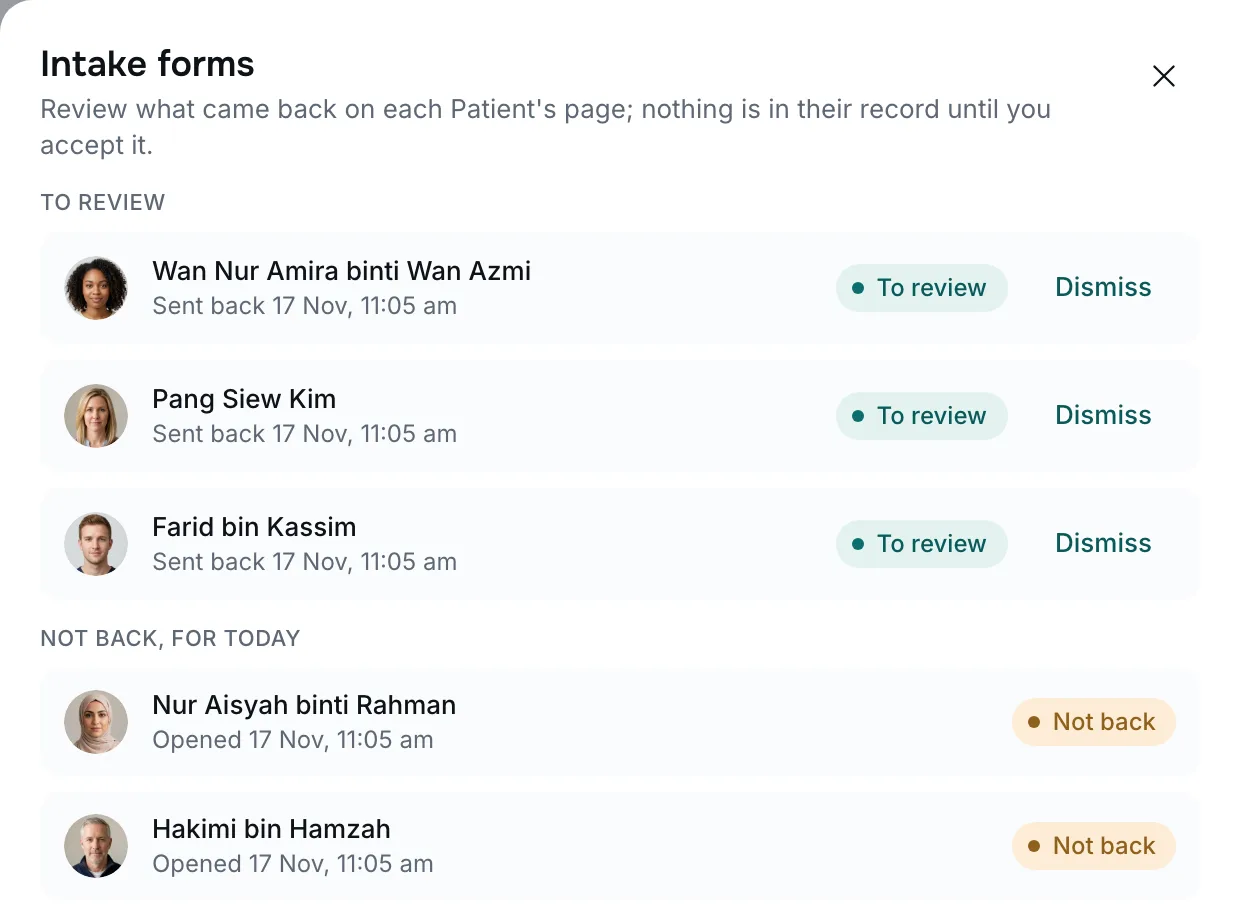
Left, the form behind the link, on a phone. Right, the desk's worklist from the check-in to-do card. Demo patients, synthetic.
What staff and patients see
The desk's day, and her code
Check-in lists every arrival with its ticket, rooming and status. On her phone, the code waits for the desk.
Front desk, Sona Pro on the web

The In clinic tab on one demo day: who is with a doctor, who is ready, and who is being roomed.
Patient, on her phone
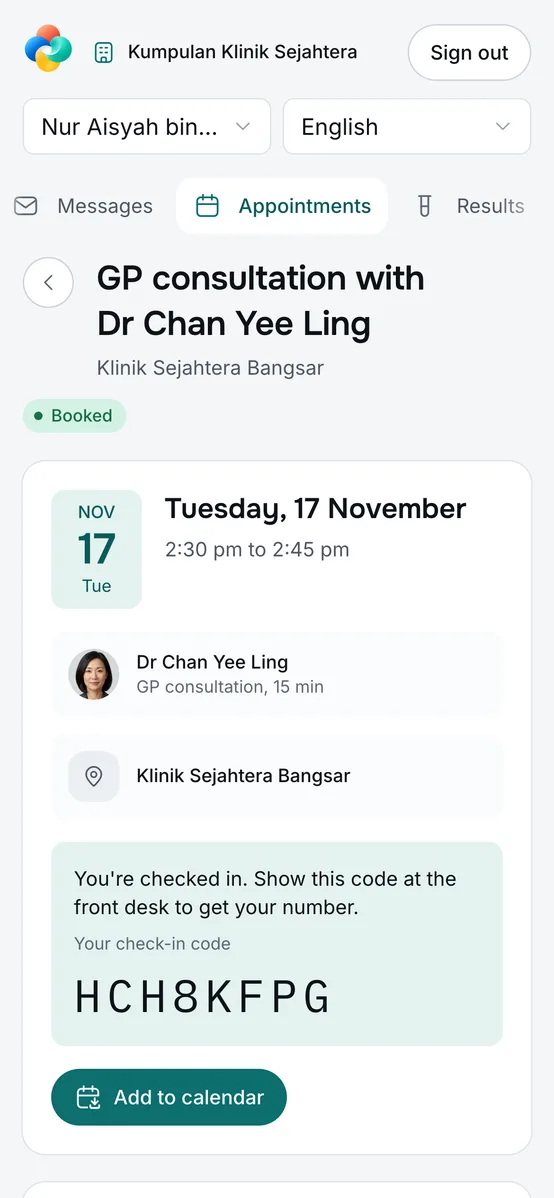
After she taps I've arrived. The code is hers for today only, and the desk's scan or typing must match it.
Guardrails
A ticket only for the right person
- The desk confirms who she is
Tapping I've arrived gives no ticket. The desk scans her QR or types its code, and a code from someone else's phone is refused. Only a patient the desk already checked in or verified today needs just one tap.
Live queue, Self check-ins - The TV never shows a name
Ticket codes, rooms and doctors only. A Clinic admin makes its link, and a new link stops the old one.
Live queue, Open TV display - Nothing reads where she is
I've arrived opens only in its time window, and the app reads no location.
Self check-in - Notices say nothing about the visit
Her turn is near shows inside the app. The only push to a patient's phone says "Open Sona: your turn is near", with no name, ticket or doctor.
Live queue, Tell me when I'm 2 away - The form only writes, and only the desk files it
The Intake form shows nothing on file. The desk accepts each field into her record or sets it aside. Allergies she types never go in from the form.
Check-in, To do, Intake forms - A missed call is followed up
A ticket that was called and did not come is marked no-show by a person, and that opens a Case for the front desk.
Live queue, No-show
Works with
Features


Solutions
- Sona CareVisits, results and questions in plain words, behind an identity check.
- Sona ProWhat needs your staff first, on the web and on iPhone.
- One patient recordCalls, chats, visits and claims write to the same patient record.
- Replies in their languageWritten replies in Malay, English, Chinese or Tamil.