

Reminders that report back
The day before each visit, Sona sends your clinic's approved WhatsApp reminder. Your front desk sees where each one stands and can remind again in one tap. It never shows what was said.
How Sona decides a statusChecked in this order. The first that applies wins.
- The patient answeredConfirmed, or asked to move
- The send failedThe channel failed, or it could not go
- 4 hours, no answerNo reply
- It reached the phoneDelivered. WhatsApp's read tick counts as this
No row ever shows the message, her reply or a reason that names her health.
Sent 2:00 pmNo reply at 6:00 pm
- Wan Nur Amira binti Wan AzmiDr Lim Mei Ling, GP consultation RemindReminded 2:00 pmDeliveredNo replyReminded 6:12 pmConfirmed
- Siti Nurhaliza binti YusofDr Chan Yee Ling, follow-up Reminded 2:00 pmDeliveredConfirmed
- Farid bin KassimDr Arvind a/l Selvaraj, GP consultation Reminded 2:00 pmDeliveredAsked to move
- Revathi a/p ManiamDr Nurul Huda binti Ismail, vaccination Reminded 2:00 pmReminder failed
- Nur Aisyah binti RahmanDr Lim Mei Ling, GP consultation RemindReminded 2:00 pmDeliveredNo reply
Rebuilt with Sona Pro's own status labels and rules. Patients, doctors and times are synthetic, from the demo clinic.
How it works
From one message to a status you can act on
Sona keeps no new record for this. The status comes from what already happened on the visit's Case: the reminder, what WhatsApp reported and what the patient answered.
-
The reminder goes the day before
By default 24 hours before each booked visit, and each clinic sets its own. Sona sends only a template a clinic admin approved, in the patient's own language when you have one approved in it.
When24 hours before the visit by default. Your clinic can change it.WhatYour clinic's own WhatsApp template, approved by a clinic admin. Nothing else is ever sent as a reminder.Which languageThe patient's preferred language first, when you have approved a template in it.The rules of the Reminders module. -
Each visit gets one plain status
Six words cover every case. Her answer wins over everything else. With no answer four hours after sending, it shows No reply.
SentReminded 2:00 pmReached her phone read counts tooDeliveredShe confirmsConfirmedShe asks for another timeAsked to moveNo answer in 4 hoursNo replyThe channel failed itReminder failedThe statuses, as Sona Pro labels them. -
Remind again in one tap
On Schedule, Check-in and Today, front desk tap Remind and the approved template goes now. Taps within 10 minutes count as one, so two desks never reach her twice.
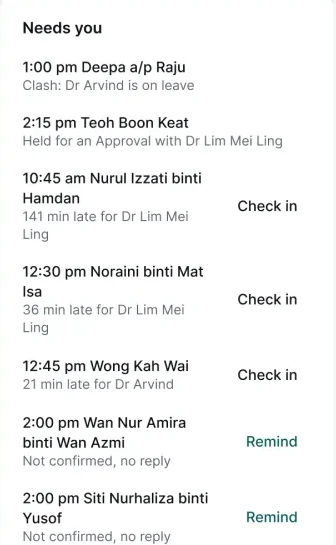
Sona Pro on the web, Schedule, Needs you. -
See if she opened what you sent
When a result, summary, Explainer or intake form first reaches her signed-in portal or app, staff see when. Only that first time is kept.
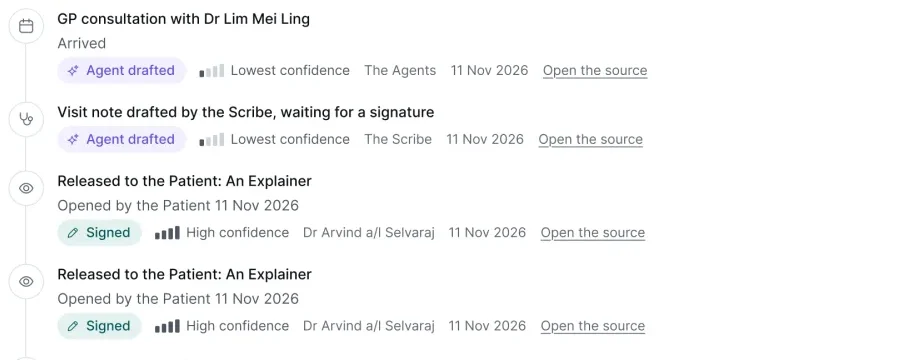
Sona Pro on the web, a demo patient's story.

What staff and patients see
Your desk sees the status, she sees one message
Front desk get a list of who has not confirmed before a busy afternoon. The patient gets your reminder on WhatsApp and answers in her own words.
Front desk, Sona Pro on the web

The day's Schedule. Visits with no answer wait under Needs you, each with Remind.
Patient, Sona Care on iPhone
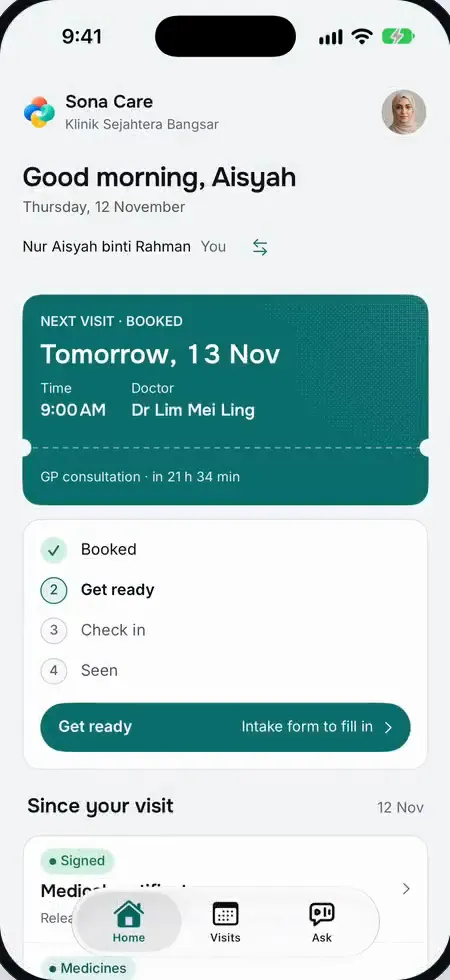
Her visit is also in Sona Care. If she answers asking for another time, your desk sees Asked to move.
Guardrails
Enough to act on, nothing more
- Status only
The list shows the visit, the status and when the reminder went. Never the wording, her reply or a reason that names her health. Anyone who needs more opens the Case.
Reminders, appointment status - No read receipts, no trackers
WhatsApp's read tick counts only as delivered. Opened is recorded by our own server when it serves the item: no pixels, tracking links, device, IP address, view counts or reading time.
Opened tracking, first open only - Only the people who book see it
Front desk, clinic admins and organisation admins. Clinicians and billing keep the daily counts, with no names.
Sona Pro, role check on every read - Only approved templates
A reminder is always a template a clinic admin approved. With none approved, or no WhatsApp number, Remind says so and sends nothing.
Reminders, approved templates - Patients are told
The privacy notice in the portal and the app says the clinic can see whether reminders reached them and when they first opened a result, summary or form. Its final wording is still under legal review.
Sona Care, privacy notice, four languages - Nothing new to keep
The status is worked out from the Case each time, so it adds no stored data. A first-open time is kept as long as the item it belongs to, and never on its own.
Reminders, derived status

